Changelog
Every version, newest first. The things worth seeing, and the whole list under them.
2.0
23 September 2026Liquid Glass, a sentence that becomes a plan, ThisDay on your wrist and on your iPad, and categories you can share.
Liquid Glass, all the way through
The Day Bar, the sheets, the menus and the cards bend the light of whatever sits under them. A switch in Settings puts the solid look back if you prefer it.
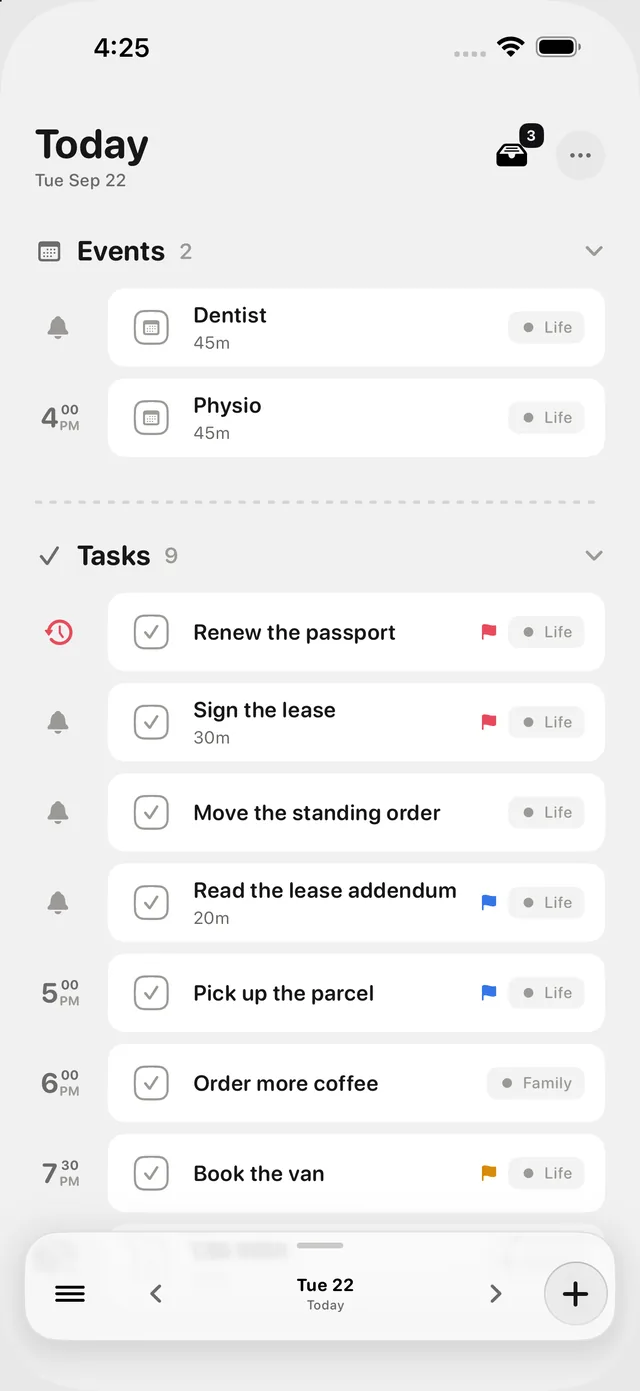
Pull the day down to go anywhere
Search comes down from the top of the page, and under it the three places you go to most. Let go on the one you want. The results arrive in the Day Bar itself.
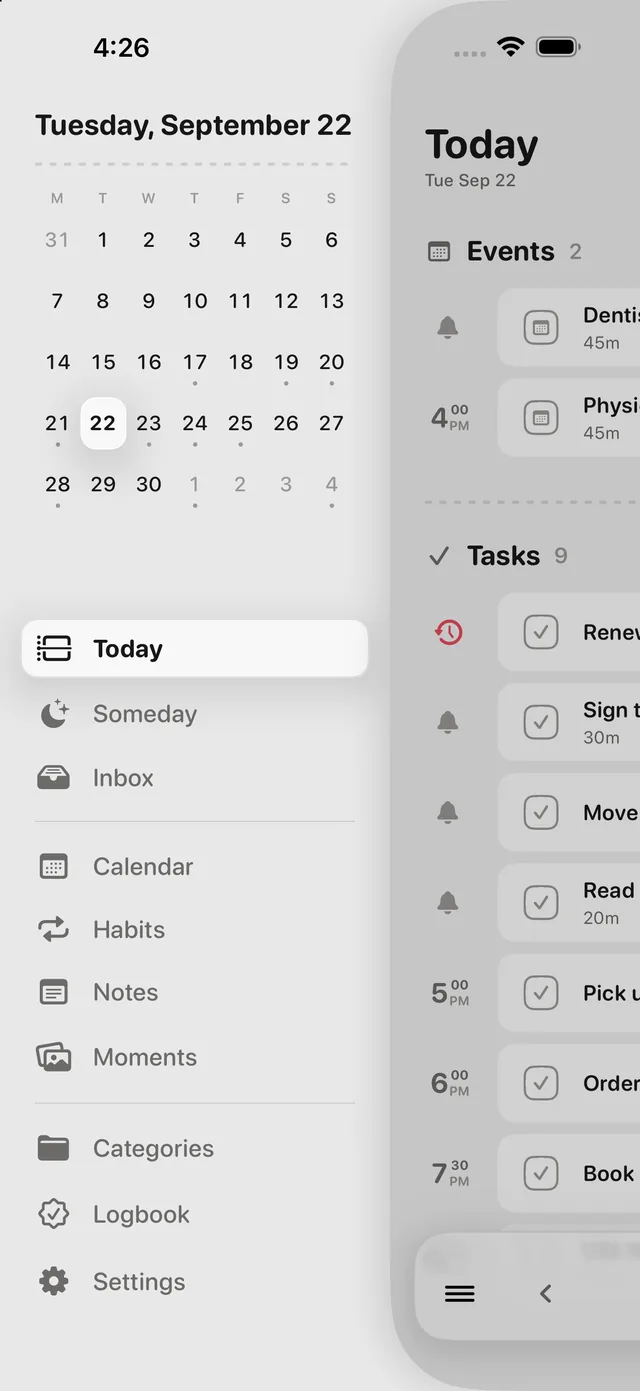
A sidebar for getting around
Every place in the app, and a month to jump through, one tap from the Day Bar. The day slides aside rather than being replaced, so the way back is the part you can still see.
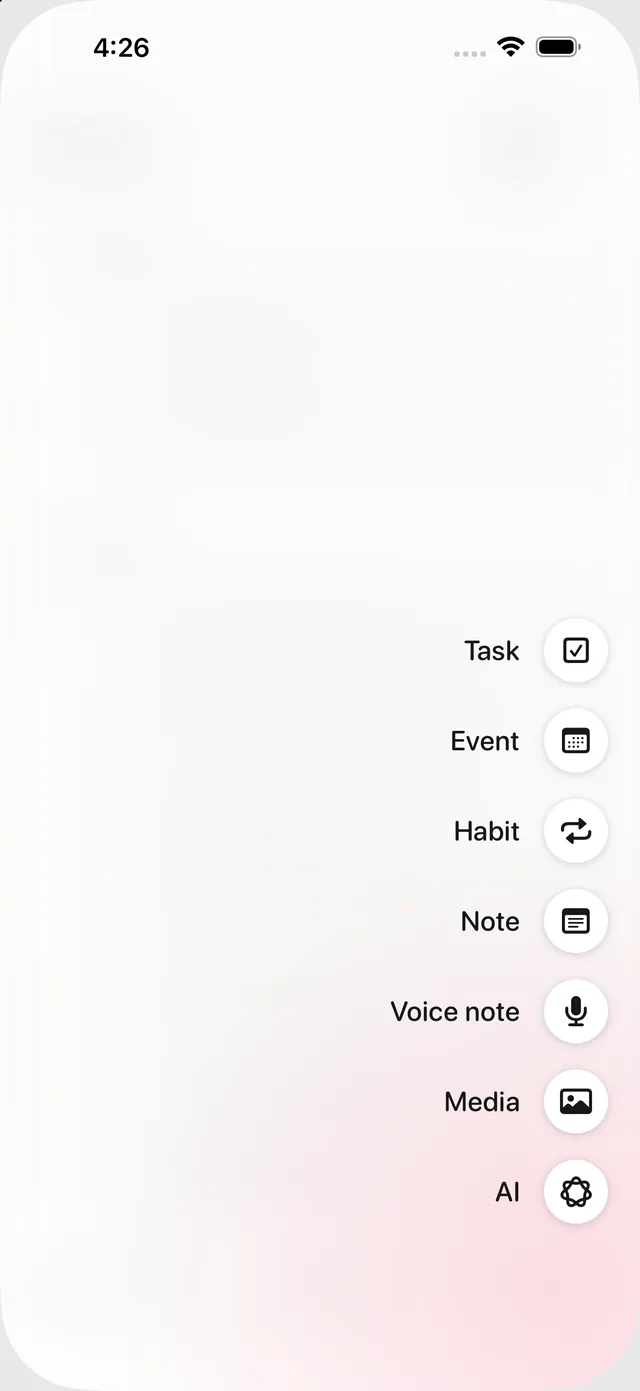
The + asks what you are adding
A task, an event, a habit, a note, a voice note, a picture, or a sentence for Apple Intelligence to sort out. Capture is a page of its own now, with room for the details and the steps.
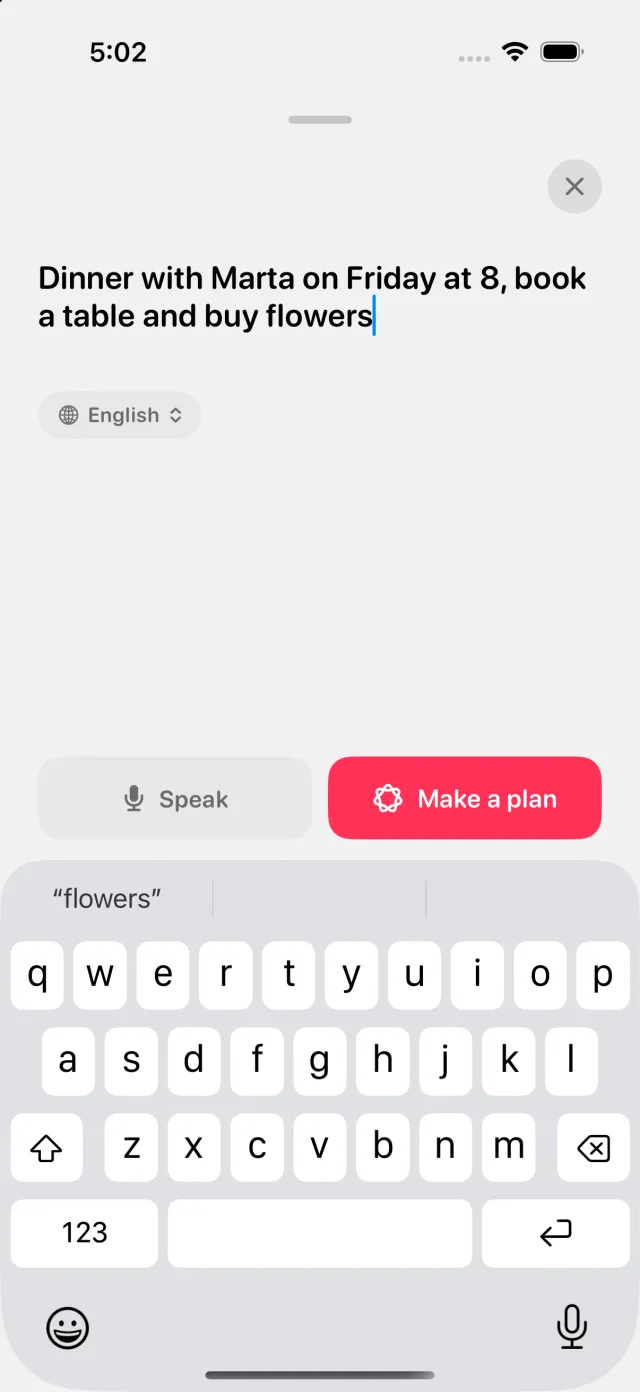
Apple Intelligence turns a sentence into a plan
"Dinner with Marta on Friday at 8, book a table and buy flowers." Apple Intelligence reads it and comes back with the event and the two tasks, each with its day, its time and its category, and you say yes before anything is saved. Type it or speak it, in any of the eleven languages. The model runs on your phone, so the sentence never leaves it.
Apple Intelligence inside a note
Ask a note for a summary, for the to-dos buried in it, or for a title it should have had. The answer comes back into the note, on device, and only when you ask for it.
Siri does the small things without the app
Add something to your day, tick something off, or ask what is on today, by voice or from a Shortcut. Siri can also write a note, add a line to one, put an event in your calendar, and tick off the very row you are looking at on screen.
ThisDay on Apple Watch
Today and your habits are one swipe apart, with the calendar, the Inbox and your categories a tap away, and a thought caught by dictation before it goes. Complications for the watch face and the Smart Stack. Included with the iPhone app.
ThisDay on iPad
A sidebar that stays open and a day with room to breathe. Same app, same purchase.
Share a category with a link
Everyone in it sees and edits what is filed there, in their own Today and Calendar, and the owner decides who can edit. It runs through iCloud, so nobody needs an account. Habits can be shared too, each with its own way of being ticked.
A note gets the whole screen
Its properties at the top, the Day Bar underneath, and the to-dos inside it are boxes you can tick.
When a month ends, ThisDay tells it back to you
A handful of cards: what you finished, the habits you kept, where the month went, the pictures you saved, and the hour of the day you actually get things done. They stay in the Logbook, and every January closes the year the same way.
Repeats that mean the 27th, the first Thursday, or the last day of the month
Your Google, Outlook and Exchange calendars, alongside everything else
Eleven languages
English, Spanish, German, French, Italian, Portuguese, Russian, Japanese, Korean, Chinese and Polish. Every screen, every notification, every widget, every Siri phrase.
Everything else in 2.049
- NewPut your day in the order you want it. Hold a row and carry it.
- NewA Categories screen, and a kind of item can start in the category you choose.
- NewShare to ThisDay from any app with a share sheet of our own.
- NewDeleting one occurrence of a repeating task now asks what you meant, the way a calendar does. This one, or this one and every one after it.
- NewYou choose what a repeating task does when its day passes without being ticked. It can stay on its day, follow you to today, or simply go.
- NewHabits that Apple Health ticks for you get a heading of their own, on the day and in the calendar. A step count is a readout, not a decision.
- NewCategory chips can drop the name and keep the mark, which gives the title back the width the word was using.
- NewThe Apple Reminders lists you choose, in your day. Reminders you already have stay read-only: those rows have no checkbox, and ThisDay never edits them.
- NewAnd the other way. Tasks you make in ThisDay can be written out as reminders, so they reach Siri, a Mac that doesn't run ThisDay, and anyone you share a list with. Off until you ask for it, and the copies it made are the only reminders it ever touches. Switch it off and they go.
- NewEvery Siri phrase is a Shortcuts action too, so a plan can add to your day, tick things off, or read the day out as one step of something bigger.
- NewCapture hears you in the language you are speaking, and a pill above the keyboard switches it for one sentence without changing the app.
- NewWhere Apple Intelligence is not available, on an older phone or in a language the model does not speak, nothing breaks. Dates are still read out of what you type, and the rest is asked for rather than guessed.
- NewAny colour you like for a category, not just the ones in the palette.
- NewSixty app icons. One group follows your accent colour and changes with it, the rest keep colours of their own.
- NewBuy me a coffee. ThisDay is made by one person, and a tip buys nothing: every part of it works exactly the same before and after.
- NewA widget for nearly everything. Today, Calendar, Inbox, Habits, Moments and Polaroids, in the sizes each one deserves.
- NewPick the habits a widget shows, or give a whole card to a single habit.
- NewMoments on the Home Screen. Pictures that rotate through the week, or one you pin and keep.
- NewTick a habit or a task straight from a widget, without opening the app.
- NewThe week can start on Saturday.
- NewWhen a newer ThisDay is on the App Store, the app says so, once, shows what the new version brings, and asks. It checks at most once a day and sends nothing about you.
- NewAfter an update, a short list of what is new, once, with the full changelog one tap away.
- BetterThe app answers quicker. Stepping through days, opening a page, searching and moving between screens no longer read everything you have ever written to draw one screen.
- BetterClosing a page takes its keyboard with it. The two used to leave one after the other.
- BetterThe save buttons in the capture sheet are pinned to the foot of it now, side by side, over a fade that lets the form show through as it scrolls under. With Details and Steps open they used to sit below the bottom of the screen, and the only clue "Add task" still existed was knowing to scroll for it.
- BetterSettings goes sideways instead of upwards. Opening a category, and then its icon picker, used to stack three sheets one on top of the other; now each one slides in beside the last with a way back in the corner.
- BetterA photo zooms to the point you pinched, and can be dragged around once it is bigger than the screen. It used to zoom to the middle and stay there.
- BetterSyncing with iCloud no longer announces itself. It says so once, on a device that has never pulled your account down before, where an empty day needs explaining. After that it works in silence.
- BetterCategories and Customization are listed directly on the page now, separated by the same dashed seam the day's own headings use, with more air between them.
- BetterA category's mark is drawn in the same space whether it is a dot or a glyph, so a list of them lines up.
- BetterThe icon and the widgets know what to do on a tinted Home Screen. Photographs keep their own colours, everything else steps into your tint.
- BetterSettings is organised by what you came to change rather than by what the app happens to store.
- FixedRepeating tasks could pile up on Today as overdue, sometimes eight copies of the same one, each insisting in its own detail that it never repeated. Only one occurrence in a series carried the rule, so every other one looked like a stray task you had missed. They all carry it now.
- FixedTwo categories with the same name closed the app as it opened.
- FixedAn event created in ThisDay and mirrored to your calendar came back and appeared twice. ThisDay no longer reads its own handwriting.
- FixedA reminder that had already rung stayed on the Lock Screen after you opened the app and ticked the thing off. Completing something, or deleting it, now takes its notification with it.
- FixedTurning a to-do in a note into a bullet spread the to-do's own spacing across the line, and the writing came out looking like typewriter text.
- FixedThe first to-do in a note had the top of its bead cut off.
- FixedThe blue bracket beside a multi-selection in the Inbox sat below the rows it was bracketing.
- FixedThe eye in Today showed nothing at all when the only thing being held back was an auto-tracked habit.
- FixedThe delete confirmation in the calendar's day view landed at the foot of the sheet, half behind the toolbar.
- FixedDeleting several picked rows in the calendar's day view went through without asking first.
- FixedA long category or calendar name no longer takes the row from the event it belongs to. Past a few characters the chip keeps its colour and drops the words.
- FixedA habit you have already ticked off no longer reminds you about it that evening.
- FixedHabit notifications arrived with a stray emoji in the title.
- FixedThe calendar in every widget was stuck on a Monday week, whatever your setting said.
- FixedA long screen name in the navigation broke across two lines mid-word and pushed the bar taller. It now shrinks to fit, in every language.
- FixedA tick made in a widget, by Siri, or on another device could leave the copy in Apple Reminders behind. Everything that changes a task now reaches it.
- FixedThe small confirmation sounds ignored the ring/silent switch after a voice note had been recorded or played. Recording and playback are meant to be heard; the taps are not, and they now hand the audio session back so the switch is obeyed again.
1.0
24 August 2026The first one.
- NewYour day in the order it happens: tasks, events, notes, voice notes and habits on one timeline.
- NewHabits that can track themselves from Apple Health.
- NewMoments, a picture for the days worth keeping one.
- NewReminders on anything, including voice notes.
- NewiCloud sync between iPhone, iPad and Mac, through your own account.