Items and their kinds
Tasks, events, notes, voice notes, pictures, habits and places. What each kind is for and what it can carry.
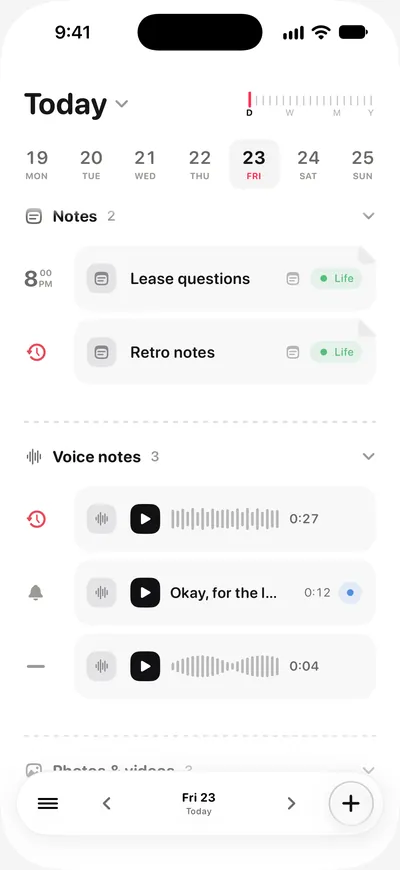
Everything in ThisDay is an item, and every item is one of seven kinds. Each kind has its own colour, so a day reads at a glance.
| Kind | What it is for | Can it remind you? |
|---|---|---|
| Task | Something to do and tick off | Yes |
| Event | Something with a start and an end | Yes, with an early alert too |
| Note | Words, checklists and headings on a full page | Yes |
| Voice note | A recording, with its words written out | Yes |
| Picture | A photo or a video kept on its day | Yes |
| Habit | Something you mean to do again and again | Yes |
| Place | Somewhere you want to go, found on Apple Maps | Yes |
One page for every item
Tap an item to open its page. When it happens is written as a sentence you can tap to change. The other fields (category, repeat, reminder, details) sit under it as pills. Tap a pill to change it.
Steps
A task can have Steps, a short checklist inside it. A setting decides whether a task with unfinished Steps can be completed.
Repeats
Any item can repeat: daily, weekly, monthly by date or by weekday (the first Thursday, say) and yearly, at intervals up to 90 days, 52 weeks or 24 months. A repeat can also count from when you last did it. When you change one occurrence, ThisDay asks whether you mean that one or the whole series.
Changing the kind
A task, an event and a note can be turned into one another from the item's page. The date, the category and the text come along.
Categories
Categories group items across days, each with its own colour and icon. Any category can be shared with other people by link, through iCloud. Everyone in it sees and edits its items in their own days, and the owner decides who can edit.
Finished and deleted items
What you tick off goes to the Logbook, the last shelf of the Library. What you delete goes there too, and can be put back until the trash is emptied.